> For the complete documentation index, see [llms.txt](https://docs.sealights.io/knowledgebase/llms.txt). Markdown versions of documentation pages are available by appending `.md` to page URLs; this page is available as [Markdown](https://docs.sealights.io/knowledgebase/test-optimization/monthly-savings-report.md).
# Monthly Savings Report
The Monthly Savings Report provides a strategic lens into the Return on Investment (ROI) generated by SeaLights Test Optimization. Purpose-built for managers and executives, this report enables leadership to track financial impact, time efficiency, and long-term organizational trends.
### Why the Monthly Savings Report?
Leadership teams require a clear, quantifiable measure of efficiency gains to justify resources and validate strategy. This report serves as a definitive record of your team's success by aggregating total time and tests saved across your entire pipeline. In just minutes, you can generate the evidence needed to prove the tangible value and competitive advantage of your Test Optimization initiative.
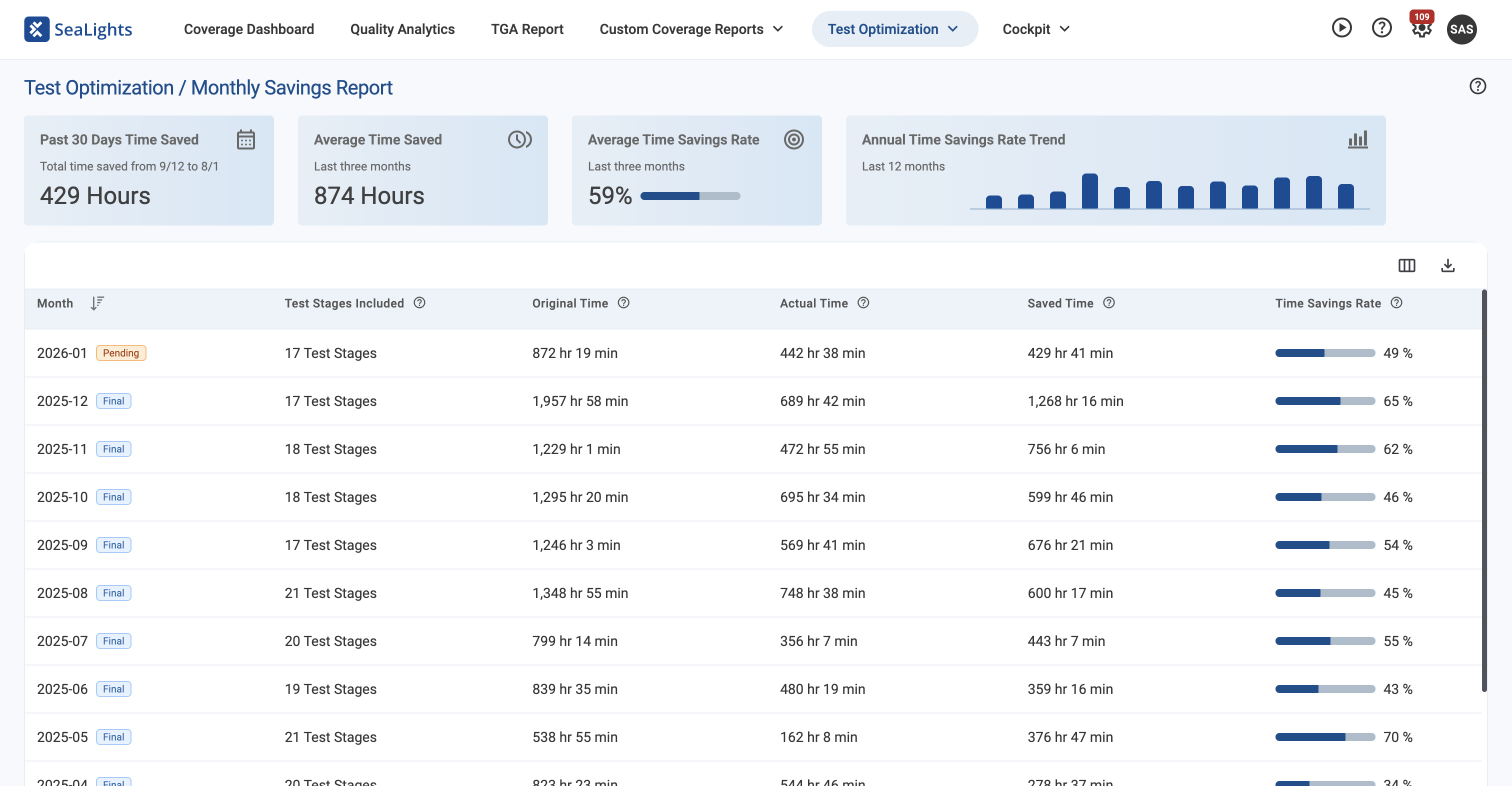
Monthly Savings Report
### Accessing the Report
You can find the Monthly Savings Report in the **Test Optimization** section of the main navigation menu.
### Measuring Your Impact
The report aggregates data from all your test stages, both **bounded and unbounded**, to provide a comprehensive view of your savings.
#### Executive Overview
At the top of the page, four key metrics provide an immediate snapshot of your team's efficiency:
* **Past 30 Days Time Saved:** The total volume of execution time reclaimed in the last month.
* **Average Time Saved:** Your typical monthly time savings based on a three-month rolling average.
* **Average Time Savings Rate:** A percentage-based efficiency score showing how much of your testing cycle is being optimized.
* **Annual Time Savings Rate Trend:** A 12-month historical chart that allows you to visualize the growth of your testing efficiency over the past year.
*Note: If your organization hasn't utilized Test Optimization in the selected period, these cards will display a dash (-) until data becomes available.*
### Monthly Savings Breakdown
The core of the report is the **Savings Per Month** table, which allows you to audit performance on a month-to-month basis.
#### Understanding the Data
Each row represents a calendar month and includes several key data points:
* **Status Tags:** Months are marked as **Pending** while the current month is active, and **Final** once the month has concluded and data is locked.
* **Test Stages Included:** See exactly how many unique test stages contributed to your savings during that period.
* **Time Metrics:** Compare **Original Time** (the total time required to run your full suite without optimization) against **Actual Time** (the optimized duration) to see your **Saved Time**.
* **Efficiency Rates:** View your **Time Savings Rate** to understand the percentage of your testing window that SeaLights successfully optimized.
#### Personalizing Your View
You can tailor the report to show the metrics that matter most to your stakeholders:
* **Customize Columns:** Click the **Customize** icon to add or remove specific data points, such as **Test Counts** (Original, Actual, and Saved) and **Test Savings Rates**. Your preferences are saved automatically.
* **Deep Dive:** Click any row in the table to open a secondary, detailed report for that specific month. This lets you confirm exactly which test stages achieved the greatest efficiencies, making it easy to replicate success across other teams.
* **Export for Reporting:** Use the **Export as CSV** button to download the full dataset (including hidden columns) for use in internal presentations or financial audits.
### Frequently Asked Questions
What is the difference between "Pending" and "Final" status?
The current calendar month is always marked as **Pending** because data is still being collected in real-time. Once the month ends, the data is aggregated and the status changes to **Final** (locked).
How is the "Original Time" calculated?
This represents the total time investment that would have been required if 100% of the test suite had been executed for every run, without SeaLights optimization.
Can I see data for specific test stages?
Yes. By clicking on any specific month in the table, you will be taken to a detailed view that breaks down the savings contribution of every individual test stage active during that month.
How much historical data is available?
In accordance with our 12-month data retention policy, both the **Annual Trend Chart** and the **Savings Per Month** table display a rolling 12-month window of data. This allows you to track your progress across a full annual cycle and compare your current efficiency against your performance from a year ago.
---
# Agent Instructions
This documentation is published with GitBook. GitBook is the documentation platform designed so that both humans and AI agents can read, navigate, and reason over technical content effectively. Learn more at gitbook.com.
## Querying This Documentation
If you need additional information that is not directly available in this page, you can query the documentation by asking a question.
Perform an HTTP GET request on the following URL with the `ask` and `goal` query parameters:
```
GET https://docs.sealights.io/knowledgebase/test-optimization/monthly-savings-report.md?ask=&goal=
```
`ask` is the immediate question: it should be specific, self-contained, and written in natural language.
`goal` is what the user is ultimately trying to achieve, the reason they need the answer. Sharing it helps GitBook give you a better, more relevant answer. A goal is most helpful when it describes the outcome the user wants rather than restating the question. For example, with `ask=how do I create an API token`, a goal like `automate deployments from our CI pipeline` lets GitBook tailor the answer to that use case.
The response will contain a direct answer to the question and relevant excerpts and sources from the documentation.
Use this mechanism when the answer is not explicitly present in the current page, you need clarification or additional context, or you want to retrieve related documentation sections.