> For the complete documentation index, see [llms.txt](https://docs.sealights.io/knowledgebase/llms.txt). Markdown versions of documentation pages are available by appending `.md` to page URLs; this page is available as [Markdown](https://docs.sealights.io/knowledgebase/whats-new/october-2025/high-visibility-quality-gates-and-failed-test-tracking.md).
# High-Visibility Quality Gates & Failed Test Tracking
We’ve updated the SeaLights Coverage Dashboard to bridge the visibility gap between your test results and your release decisions. This update introduces a brand-new metric for tracking failures and a visual overhaul of how Quality Gate violations are displayed.
### 1. New Metric: Remaining Failed Tests
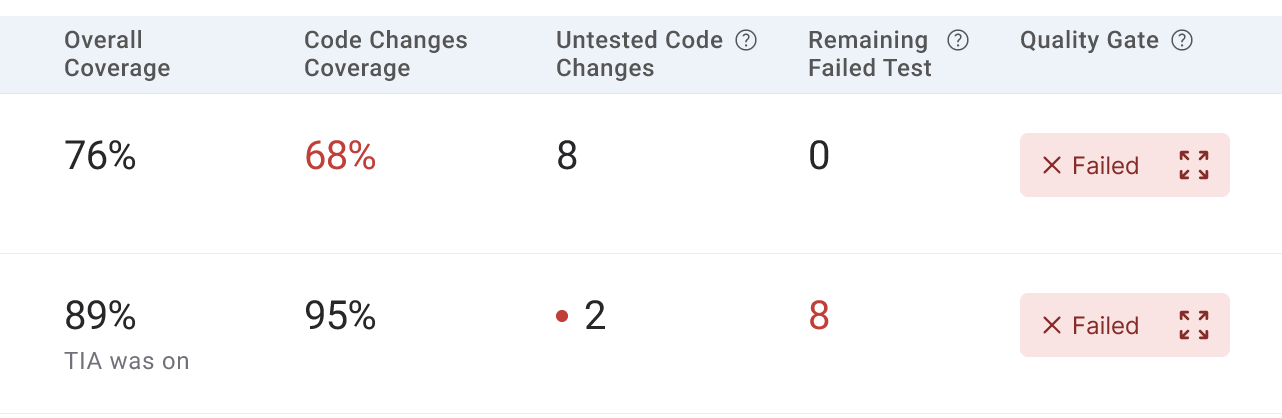
We’ve added a dedicated **"Remaining Failed Tests"** column to the Coverage Dashboard and Test Stage tables. This provides a definitive count of unique failures that actually need your attention.
* **At-a-Glance Totals:** View the count of unique tests that failed in their last run, aggregated across all stages at the build level.\

* **Test Stage Precision:** Drill down to see specific failure counts for individual stages.
* **The "Last Result" Logic:** This metric intelligently counts unique tests whose **last execution status** in the build was "Failed". If a test failed but passed in a later execution, it won't count here.
* **Detailed Drill-Down:** Click the list icon next to any failure count in the Test Stage table to open a searchable, paginated popup. This view shows the **Test Name** and **Latest Iteration Number**, allowing you to see exactly which tests are blocking your release.
### 2. Visual Quality Gate Indicators
To make build status immediately obvious, we have introduced a **Red Highlight** system for Quality Gate violations.
Rather than checking settings manually, any metric that is part of an active Quality Gate will now turn **Red** if it violates your threshold. This applies to:
* **Overall Coverage**
* **Code Changes Coverage**
* **Remaining Failed Tests** (New!)
When you see red on your dashboard, you know exactly which metric caused the Quality Gate to fail, allowing for immediate remediation.
### 3. Pro-Tip: Upgrade to "Latest Result " Mode
To get the most out of these new dashboard indicators, we strongly recommend moving your Quality Gate configurations to use the **Latest Result Method for Failed Tests.**
The "Remaining Failed Tests" metric and its corresponding red-text alerts are designed to work in tandem with this mode, providing the most accurate reflection of your build's quality.
[Learn how to enable Last Result Method →](https://docs.sealights.io/knowledgebase/whats-new/march-2025/quality-gates-flexible-failure-criteria)
***
*The new columns are enabled by default and can be toggled via the **Customize** button.*
---
# Agent Instructions
This documentation is published with GitBook. GitBook is the documentation platform designed so that both humans and AI agents can read, navigate, and reason over technical content effectively. Learn more at gitbook.com.
## Querying This Documentation
If you need additional information that is not directly available in this page, you can query the documentation by asking a question.
Perform an HTTP GET request on the following URL with the `ask` and `goal` query parameters:
```
GET https://docs.sealights.io/knowledgebase/whats-new/october-2025/high-visibility-quality-gates-and-failed-test-tracking.md?ask=&goal=
```
`ask` is the immediate question: it should be specific, self-contained, and written in natural language.
`goal` is what the user is ultimately trying to achieve, the reason they need the answer. Sharing it helps GitBook give you a better, more relevant answer. A goal is most helpful when it describes the outcome the user wants rather than restating the question. For example, with `ask=how do I create an API token`, a goal like `automate deployments from our CI pipeline` lets GitBook tailor the answer to that use case.
The response will contain a direct answer to the question and relevant excerpts and sources from the documentation.
Use this mechanism when the answer is not explicitly present in the current page, you need clarification or additional context, or you want to retrieve related documentation sections.