> For the complete documentation index, see [llms.txt](https://docs.sealights.io/knowledgebase/llms.txt). Markdown versions of documentation pages are available by appending `.md` to page URLs; this page is available as [Markdown](https://docs.sealights.io/knowledgebase/setup-and-configuration/build-and-test-execution/integration-build/3-component-integration-build.md).
# 3-Component Integration Build
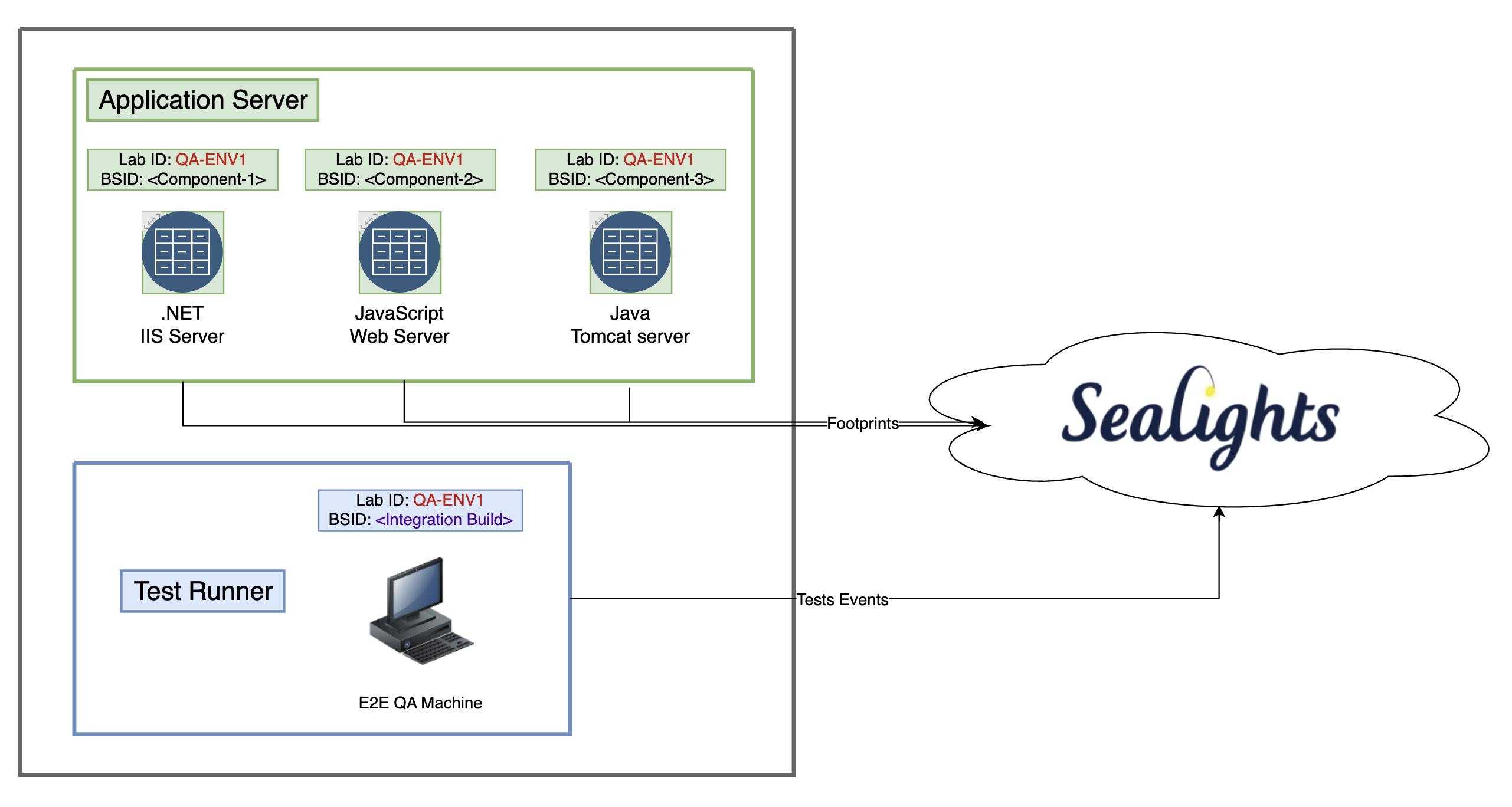
The steps described below define how to report an integration build from 3 components: two backends (Java & .NET) and a front end (JavaScript).
The architecture diagram of the use case described in this tutorial:
## Step 0 - Define a common LabID
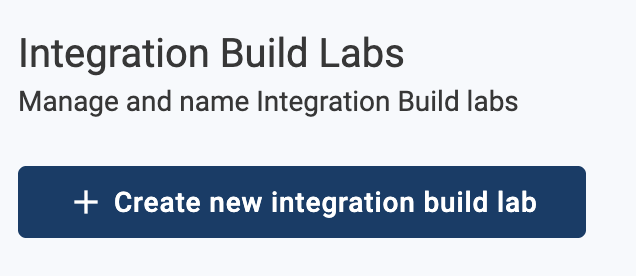
The Sealights' LabID is a string that identifies the testing environment. Normally, this string is generated in the dashboard under the Settings > Integration Build Labs:
In the current example (our tutorial), the **LabID used** will be **QA-ENV1**.
{% hint style="info" %}
Note: The ability to add the Integration Build Lab identifier will be available only after completing Step 2 in this walkthrough
{% endhint %}
## Step 1 - Build, Report & Deploy Components
### **Component-1 - Back end, Java (Tomcat)**
* Build and Report Component #1 to the Sealights dashboard
{% code overflow="wrap" lineNumbers="true" %}
```
java -jar sl-build-scanner.jar -config -appname Component-1 -branchname tutorial/master -buildname 1.0.0 -pi *com.example.*
java -jar sl-build-scanner.jar -scan -tokenfile .../sltoken.txt -buildsessionid= -workspacepath "..." -fi "*.class,*.jar" -r
```
{% endcode %}
* Deploy Component #1: In the JVM arguments, specify a Lab ID parameter (QA-ENV1).
{% code overflow="wrap" lineNumbers="true" %}
```
JAVA_OPTS=-javaagent:sl-test-listener.jar -Dsl.labId=QA-ENV1 -Dsl.buildSessionId= -Dsl.tokenFile=sltoken.txt
```
{% endcode %}
### **Component-2 - Back end, .NET (IIS)**
* Build and Report Component #2 to the Sealights dashboard:
{% code overflow="wrap" lineNumbers="true" %}
```
SL.DotNet.exe config --appName "Component-2" --branchName "tutorial/master" --buildName "1.2.0" --includeNamespace myNameSpace.* --buildSessionIdFile buildSessionId.txt
SL.DotNet.exe scan --buildSessionId= --workspacePath c:\path\to\binaries --ignoreGeneratedCode true
```
{% endcode %}
* Deploy Component #2: when starting the collector service session, specify the same Lab ID parameter as before:
{% code overflow="wrap" lineNumbers="true" %}
```
SL.DotNet.exe startCollectorServiceSession --buildSessionIdFile buildSessionId.txt --processName w3wp.exe --applicationPool DefaultAppPool --includeChildProcesses true --labId QA-ENV1
```
{% endcode %}
### **Component-3 - Front end, JavaScript**
* Build and Report Component #3 to the dashboard:
{% code overflow="wrap" lineNumbers="true" %}
```
./node_modules/.bin/slnodejs config --tokenfile ./sltoken.txt --appname "Component-3" --branch "tutorial/master" --build "1.0.0"
./node_modules/.bin/slnodejs scan --tokenfile ./sltoken.txt --buildsessionid --instrumentForBrowsers --workspacepath dist --outputpath sl_dist --scm git --labid QA-ENV1
```
{% endcode %}
* Deploy the instrumented version of your code onto the webserver.
{% hint style="info" %}
Unlike previous steps, with Front End JavaScript the Lab ID is generally defined within the build scan command.\
Please refer to [Deploying Instrumented Code](/knowledgebase/setup-and-configuration/sealights-agents-and-plugins/node.js-agent/legacy-commands-deprecated/front-end-application/deploying-instrumented-code.md#deploying-instrumentation-for-several-environments-lab-ids) for further details.
{% endhint %}
{% hint style="success" %}
All the 3 components are reported to Sealights dashboard and their active instance (application servers) share the same LabID.
{% endhint %}
## Step 2 - Create Integration Build & Report Its Components
Create an integration build using one of the following methods:
1. SeaLights agent command: [Component File](/knowledgebase/setup-and-configuration/build-and-test-execution/integration-build/integration-build-explicit-components-and-versions/component-file.md)
2. REST API calls using Sealights APIs: [Integration Builds](/knowledgebase/setup-and-configuration/integrations/rest-apis/integration-builds.md)
In our case, we will provide the following JSON file content to the agent scan command (as a file named `sl-integration-components.json`)
{% code overflow="wrap" lineNumbers="true" %}
```json
[
{
"appName": "Component-1",
"branch": "tutorial/master",
"build": "1.0.0"
},
{
"appName": "Component-2",
"branch": "tutorial/master",
"build": "1.2.0"
},
{
"appName": "Component-3",
"branch": "tutorial/master",
"build": "1.0.0"
}
]
```
{% endcode %}
From the different options available, we’ll go with the Java agent to report this integration build
{% code overflow="wrap" lineNumbers="true" %}
```
java -jar sl-build-scanner.jar -config -tokenfile ./sltoken.txt -appname "MyIntegrationBuildApp" -branchname "master" -buildname "0.1.0" -pi "*integration.build*" -buildSessionIdFile integrationBSID.txt
java -jar sl-build-scanner.jar -scan -tokenfile sltoken.txt -buildsessionidfile integrationBSID.txt -componentfile sl-integration-components.json
```
{% endcode %}
{% hint style="success" %}
The integration Build builds now appears in your dashboard.
{% endhint %}
## Step 3 - Execute Tests Against Integration Build
### Application Server Configuration Review
The build session ID used should correspond to the **component** (unique per component), whereas the lab ID should correspond to the **environment** (shared between components). For example:
BuildSessionId
LabId
Back end environment which contains Component #1
BSID-Component #1
QA-ENV1
Back end environment which contains Component #2
BSID-Component #2
QA-ENV1
Front end environment which contains Component #3
BSID-Component #3
QA-ENV1
#### Test Runner Configuration Review
* The **build session ID used** for reporting test executions should correspond to the **integration build**, under which the information will be displayed.
* The **lab ID** should reflect the **same environment identifier** as the other components which make up the integration build to ensure all the coverage data will be linked together (In our example: **QA-ENV1)**.
* If running tests using the **Maven** **plugin**, make the following modifications to the .JSON configuration file before executing your tests with the SeaLights plugin enabled:
{% code overflow="wrap" lineNumbers="true" %}
```
{
...
"buildSessionId": "",
"testStage": "E2E Tests",
"labId": QA-ENV1,
"executionType": "testsonly",
...
}
```
{% endcode %}
* If running tests using the **Gradle** **plugin**, make the following modifications to your build.gradle according to the following example:
{% code overflow="wrap" lineNumbers="true" %}
```
buildscript {
...
allprojects {
sealights {
...
buildSessionId = ""
runTestOnly=true
testTasksAndStages=["E2test":"E2E Tests"]
labId="QA-ENV1"
...
}
...
}
...
}
```
{% endcode %}
* If running tests using **Java** **CLI commands**, use the following configuration in your start/end execution commands:
{% code overflow="wrap" lineNumbers="true" %}
```
java -jar sl-test-listener.jar start -tokenfile .../sltoken.txt -buildsessionid -testStage "E2E Tests" -labid QA-ENV1
java -jar sl-test-listener.jar end -tokenfile .../sltoken.txt -buildsessionid -labid QA-ENV1
```
{% endcode %}
***
{% hint style="success" %}
Once the above steps are completed, coverage is collected from the individual components, with the metrics displayed on the integration build level in the Sealights dashboard.
{% endhint %}
---
# Agent Instructions
This documentation is published with GitBook. GitBook is the documentation platform designed so that both humans and AI agents can read, navigate, and reason over technical content effectively. Learn more at gitbook.com.
## Querying This Documentation
If you need additional information that is not directly available in this page, you can query the documentation by asking a question.
Perform an HTTP GET request on the following URL with the `ask` and `goal` query parameters:
```
GET https://docs.sealights.io/knowledgebase/setup-and-configuration/build-and-test-execution/integration-build/3-component-integration-build.md?ask=&goal=
```
`ask` is the immediate question: it should be specific, self-contained, and written in natural language.
`goal` is what the user is ultimately trying to achieve, the reason they need the answer. Sharing it helps GitBook give you a better, more relevant answer. A goal is most helpful when it describes the outcome the user wants rather than restating the question. For example, with `ask=how do I create an API token`, a goal like `automate deployments from our CI pipeline` lets GitBook tailor the answer to that use case.
The response will contain a direct answer to the question and relevant excerpts and sources from the documentation.
Use this mechanism when the answer is not explicitly present in the current page, you need clarification or additional context, or you want to retrieve related documentation sections.