# Required Pull Request Parameters (SCM/CI)

When reporting a Pull Request to SeaLights, the parameters required to configure the pull request BSID vary between the source control provider.\
This article will help you to map the required parameters to their location within the few most common source control or CI providers.

Here is a table summarizing the most common variables in use in the relevant SCM section

<table><thead><tr><th width="136.5234375">Sealights PR Parameter</th><th width="152.72265625">Jenkins GitHub Pull Request Builder variables</th><th>BitBucket env. variables</th><th>GitLab env. variables</th><th>Generic Git variables</th></tr></thead><tbody><tr><td><strong>pullRequestNumber</strong></td><td><code>ghprbPullId</code></td><td><code>BITBUCKET_PR_ID</code></td><td><code>CI_EXTERNAL_PULL_REQUEST_IID</code></td><td><code>GIT_PULL_REQUEST</code></td></tr><tr><td><strong>latestCommit</strong></td><td><code>ghprbActualCommit</code></td><td><code>BITBUCKET_COMMIT</code></td><td><code>CI_COMMIT_SHA</code></td><td><code>GIT_COMMIT</code></td></tr><tr><td><strong>repoUrl</strong> </td><td><code>ghprbPullLink</code></td><td><code>BITBUCKET_REPO_SLUG</code> or <code>BITBUCKET_GIT_HTTP_ORIGIN</code></td><td><code>CI_REPOSITORY_URL</code></td><td><code>GIT_REPO_URL</code></td></tr><tr><td><strong>targetBranch</strong></td><td><code>ghprbTargetBranch</code></td><td><code>BITBUCKET_PR_DESTINATION_BRANCH</code></td><td><code>CI_EXTERNAL_PULL_REQUEST_TARGET_BRANCH_NAME</code></td><td><code>CHANGE_TARGET</code></td></tr></tbody></table>

{% hint style="warning" %}
For **latestCommit** parameter, we’re highlighting the *short version* in the screenshots below but the long/entire SHA identifier needs to be used.
{% endhint %}

## GitHub <a href="#github" id="github"></a>

<figure><img src="https://4057366433-files.gitbook.io/~/files/v0/b/gitbook-x-prod.appspot.com/o/spaces%2FAjqTCMRYvHhDgsdPLUnc%2Fuploads%2F9B8mwCAgv6ed9YSnfow1%2Fimage-20200308-125331.png?alt=media&#x26;token=855886d7-9164-4a5b-8c43-5f74c6ae0e1c" alt=""><figcaption></figcaption></figure>

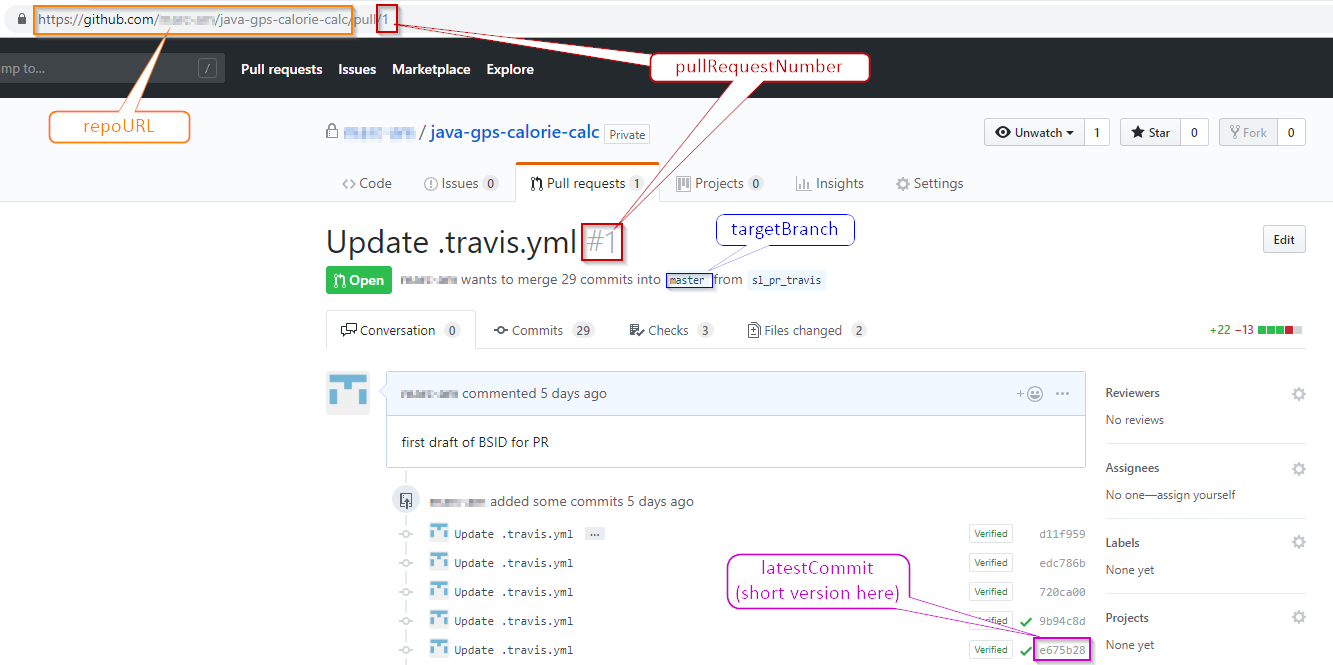
If you’re using the GitHub Actions or the GitHub Pull Request Builder plugin for Jenkins, you can use the following mapping to variables suggested below

<table><thead><tr><th width="167.00390625">Sealights PR Parameter</th><th width="173.18359375">GitHub Actions variables</th><th width="133.61328125">GitHub PR Builder variables (Jenkins plugin)</th><th>Comment</th></tr></thead><tbody><tr><td><strong>pullRequestNumber</strong></td><td><code>github.event.pull_request.number</code></td><td><code>ghprbPullId</code></td><td> </td></tr><tr><td><strong>latestCommit</strong></td><td><code>github.event.pull_request.head.sha</code></td><td><code>ghprbActualCommit</code></td><td> </td></tr><tr><td><strong>repoUrl</strong> </td><td><code>$GITHUB_SERVER_URL/$GITHUB_REPOSITORY</code></td><td><code>ghprbPullLink</code></td><td>Something similar to: <a href="https://github.mycompany.com/myappjava/">https://github.mycompany.com/myappjava/</a> if the pull request URL is<br><a href="https://github.mycompany.com/myappjava/"><strong>https://github.mycompany.com/myappjava/</strong></a>pull/8031 in other words everything before word ‘pull’ like shown in the picture above</td></tr><tr><td><strong>targetBranch</strong></td><td><code>github.event.pull_request.base.ref</code></td><td><code>ghprbTargetBranch</code></td><td>This is the branch name itself and might need to have a prefix added (Like: "origin/") to match the branch that was provided to SeaLights when scanning the merged branch</td></tr></tbody></table>

## GitLab <a href="#gitlab" id="gitlab"></a>

{% hint style="info" %}
Please notice GitLab refers to this capability as **Merge Request (MR)** and not as Pull Request (See [GitLab documentation](https://docs.gitlab.com/ee/user/project/merge_requests/getting_started.html) for more details).
{% endhint %}

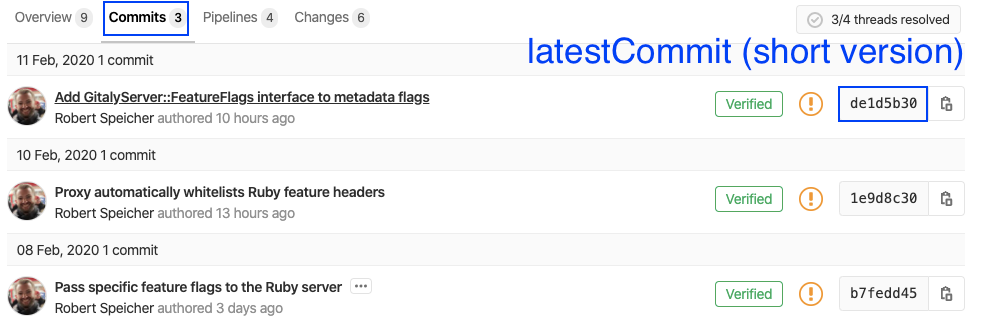
<figure><img src="https://4057366433-files.gitbook.io/~/files/v0/b/gitbook-x-prod.appspot.com/o/spaces%2FAjqTCMRYvHhDgsdPLUnc%2Fuploads%2FbrgZPGUiTL2c0TGomeVR%2Fimage-20200211-120659.png?alt=media&#x26;token=dcdaa0d9-3dfd-4cdc-83ea-10c097a6e54e" alt=""><figcaption></figcaption></figure>

Then, switching to the “Commits” tab:

<figure><img src="https://4057366433-files.gitbook.io/~/files/v0/b/gitbook-x-prod.appspot.com/o/spaces%2FAjqTCMRYvHhDgsdPLUnc%2Fuploads%2F0F6JtpyKxKJhO61vFA57%2Fimage-20200211-120502.png?alt=media&#x26;token=c2129ac6-3776-49b5-b6f7-cb5dd032e5a8" alt=""><figcaption></figcaption></figure>

{% hint style="info" %}
More details for GitLab may be found in the official documentation: <https://docs.gitlab.com/ee/ci/variables/predefined_variables.html>
{% endhint %}

### Using the GitLab plugin for Jenkins <a href="#using-the-gitlab-plugin-for-jenkins" id="using-the-gitlab-plugin-for-jenkins"></a>

If you’re using the [GitLab plugin for Jenkins](https://plugins.jenkins.io/gitlab-plugin/) you can use the following mapping to environment variables provided by the plugin

<table><thead><tr><th width="179.77734375">Sealights PR Parameter</th><th width="257.36328125">GitLab plugin variables</th><th>Comment</th></tr></thead><tbody><tr><td><strong>pullRequestNumber</strong></td><td><code>gitlabMergeRequestIid</code></td><td> </td></tr><tr><td><strong>latestCommit</strong></td><td><code>gitlabMergeRequestLastCommit</code></td><td> </td></tr><tr><td><strong>repoUrl</strong> </td><td><code>gitlabSourceRepoHomepage</code></td><td> </td></tr><tr><td><strong>targetBranch</strong></td><td><code>gitlabTargetBranch</code></td><td>This is the branch name itself and might need to have a prefix added (Like: "origin/") to match the branch that was provided to SeaLights when scanning the target branch</td></tr></tbody></table>

{% hint style="info" %}
More details about available variables from this plugin may be found in the official documentation: [GitHub - jenkinsci/gitlab-plugin: A Jenkins plugin for interfacing with GitLab](https://github.com/jenkinsci/gitlab-plugin#defined-variables)
{% endhint %}

## BitBucket <a href="#bitbucket" id="bitbucket"></a>

<figure><img src="https://4057366433-files.gitbook.io/~/files/v0/b/gitbook-x-prod.appspot.com/o/spaces%2FAjqTCMRYvHhDgsdPLUnc%2Fuploads%2Fo2D98a0XhPUSXS9jfVo3%2Fimage-20200211-121237.png?alt=media&#x26;token=6f5c0dc7-a8a1-460e-bac3-1153ee5e4dbe" alt=""><figcaption></figcaption></figure>

Bitbucket provides a set of default variables that are available for builds, and can be used in scripts. These variables are detailed in the official [Bitbucket documentation](https://confluence.atlassian.com/bitbucket/environment-variables-794502608.html) and can be used like below

<table><thead><tr><th width="176.53515625">Sealights PR Parameter</th><th width="216.83203125">BitBucket Env. Variable</th><th>Comment</th></tr></thead><tbody><tr><td><strong>pullRequestNumber</strong></td><td><code>BITBUCKET_PR_ID</code></td><td> </td></tr><tr><td><strong>latestCommit</strong></td><td><code>BITBUCKET_COMMIT</code></td><td> </td></tr><tr><td><strong>repoUrl</strong> </td><td><code>BITBUCKET_REPO_SLUG</code></td><td>In some configurations, you may need to prepend the base URL of your repository, like "<a href="https://bitbucket.mycompany.int/">https://bitbucket.mycompany.int/</a>$BITBUCKET_REPO_SLUG"</td></tr><tr><td><strong>targetBranch</strong></td><td><code>BITBUCKET_PR_DESTINATION_BRANCH</code></td><td>This is the branch name itself and might need to have a prefix added (Like: "origin/") to match the branch that was provided to SeaLights when scanning the merged branch</td></tr></tbody></table>

### Using Webhook to Jenkins for Bitbucket plugin (sending URL parameters to Jenkins) <a href="#using-webhook-to-jenkins-for-bitbucket-plugin-sending-url-parameters-to-jenkins" id="using-webhook-to-jenkins-for-bitbucket-plugin-sending-url-parameters-to-jenkins"></a>

Pull Request-related variables (e.g. Pull Request number) can be passed from Bitbucket to a Jenkins job via the *Webhook to Jenkins for Bitbucket* plugin using URL parameters to be defined in the plugin settings.

In the example below, the Bitbucket Pull Request ID number (parameter `PR_ID`) is being passed via the `PR_NUM` variable name and this variable will then be available as a parameter within the Jenkins job. Each URL parameter to be passed should be placed on a separate line in the URL parameters box.

<figure><img src="https://4057366433-files.gitbook.io/~/files/v0/b/gitbook-x-prod.appspot.com/o/spaces%2FAjqTCMRYvHhDgsdPLUnc%2Fuploads%2F4i6VSE757O2B5ESj9duS%2FWebhook-PR-Bitbucket-2.png?alt=media&#x26;token=aac43a03-2573-4d10-ae58-20ffa3b45225" alt=""><figcaption></figcaption></figure>

{% hint style="info" %}
Documentation for the above plugin settings is available here <https://mohamicorp.atlassian.net/wiki/spaces/DOC/pages/210305025/Sending+URL+Parameters+to+Jenkins#Available-Parameters>
{% endhint %}

## Bamboo <a href="#bamboo" id="bamboo"></a>

<table><thead><tr><th width="186.91015625">Sealights PR Parameter</th><th width="223.51171875">Bamboo Build env. variables</th><th>Comment</th></tr></thead><tbody><tr><td><strong>pullRequestNumber</strong></td><td> </td><td>Please refer to the workaround(s) shared in the comments of this Bamboo support page: <a href="https://jira.atlassian.com/browse/BAM-18350">https://jira.atlassian.com/browse/BAM-18350</a></td></tr><tr><td><strong>latestCommit</strong></td><td><code>bamboo.repository.pr.key</code></td><td> </td></tr><tr><td><strong>repoUrl</strong> </td><td><code>bamboo.planRepository.&#x3C;position>.repositoryUrl</code></td><td> </td></tr><tr><td><strong>targetBranch</strong></td><td><code>bamboo.repository.pr.targetBranch</code></td><td>The base reference name of the webhook event that triggered the build. It is the branch reference for pull requests (i.e. target branch).<br>It may require some string manipulation to match the branch name that was provided to SeaLights when scanning the reference branch.</td></tr></tbody></table>

{% hint style="info" %}
More details for Bamboo CI may be found in the official documentation: [Bamboo variables | Bamboo Data Center 11.0 | Atlassian Documentation](https://confluence.atlassian.com/bamboo/bamboo-variables-289277087.html)
{% endhint %}

## Azure DevOps (formerly Team Foundation Server) <a href="#azure-devops-formerly-team-foundation-server" id="azure-devops-formerly-team-foundation-server"></a>

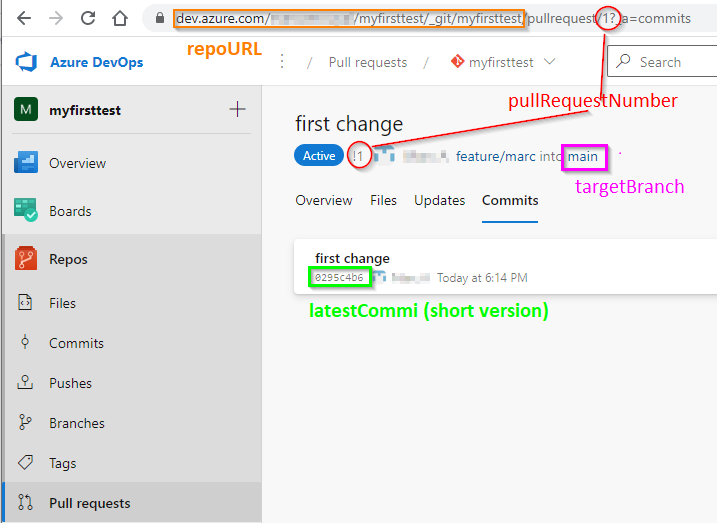
Sealights provides support only for ADO or TFS “Git-Based“ repositories: `TfsGit`, `Git,` or `GitHub`. Pull Request integration won’t work with `TfsVersionControl` or `Svn` repository types.

<figure><img src="https://4057366433-files.gitbook.io/~/files/v0/b/gitbook-x-prod.appspot.com/o/spaces%2FAjqTCMRYvHhDgsdPLUnc%2Fuploads%2F5begXUFQIRIzFFLqan4i%2Fimage-20211020-152913.png?alt=media&#x26;token=93c40a3e-5627-41e2-a98a-b86a13fabe8d" alt=""><figcaption></figcaption></figure>

<table><thead><tr><th width="186.1875">Sealights PR Parameter</th><th width="162.73046875">env. variables</th><th>Comment</th></tr></thead><tbody><tr><td><strong>pullRequestNumber</strong></td><td><code>System.PullRequest.PullRequestNumber</code></td><td> </td></tr><tr><td><strong>latestCommit</strong></td><td> </td><td>The default environment ADO variable <code>Build.SourceVersion</code> cannot be used. It is not providing the latest commit from the PR branch - as expected by Sealights - but only the local commit resulting from the merge operation.<br>A common solution is to retrieve the “-1” commit identifier in form the <code>git log</code> command.</td></tr><tr><td><strong>repoUrl</strong> </td><td><code>System.PullRequest.SourceRepositoryURI</code></td><td> </td></tr><tr><td><strong>targetBranch</strong></td><td><code>System.PullRequest.TargetBranch</code></td><td>This is the branch name itself and might need some string manipulation to remove a prefix added (Like: "refs/heads/") to match the branch that was provided to SeaLights when scanning the merged branch.</td></tr></tbody></table>

{% hint style="info" %}
More details for ADO/TFS variables may be found in the official documentation: [Predefined variables - Azure Pipelines](https://docs.microsoft.com/en-us/azure/devops/pipelines/build/variables)
{% endhint %}

## AWS CodeBuild <a href="#aws-codebuild" id="aws-codebuild"></a>

<table><thead><tr><th width="175.984375">Sealights PR Parameter</th><th width="194.109375">AWS Code Build env. variables</th><th>Comment</th></tr></thead><tbody><tr><td><strong>pullRequestNumber</strong></td><td><code>CODEBUILD_WEBHOOK_TRIGGER</code></td><td>For builds triggered by a pull request, its format is <code>pr/pull-request-number</code>: a string manipulation is required to remove the <code>/pr</code> prefix and retrieve the number itself.</td></tr><tr><td><strong>latestCommit</strong></td><td><code>CODEBUILD_RESOLVED_SOURCE_VERSION</code></td><td> </td></tr><tr><td><strong>repoUrl</strong> </td><td><code>CODEBUILD_SOURCE_REPO_URL</code></td><td> </td></tr><tr><td><strong>targetBranch</strong></td><td><code>CODEBUILD_WEBHOOK_BASE_REF</code></td><td>The base reference name of the webhook event that triggered the build. It is the branch reference for pull requests (i.e. target branch).<br>It may require some string manipulation to match the branch name that was provided to SeaLights when scanning the reference branch.</td></tr></tbody></table>

{% hint style="info" %}
More details for AWS CodeBuild may be found in the official documentation: <https://docs.aws.amazon.com/codebuild/latest/userguide/build-env-ref-env-vars.html>
{% endhint %}

## Related articles <a href="#related-articles" id="related-articles"></a>

* [configure-pull-request-flow-for-sealights](https://docs.sealights.io/knowledgebase/setup-and-configuration/integrations/pull-request-integration/configure-pull-request-flow-for-sealights "mention")
* Gradle: [scanning-builds](https://docs.sealights.io/knowledgebase/setup-and-configuration/sealights-agents-and-plugins/java-build-tools-plugins/sealights-gradle-plugin/scanning-builds "mention")
* [prconfig-command-reference](https://docs.sealights.io/knowledgebase/setup-and-configuration/integrations/pull-request-integration/prconfig-command-reference "mention")